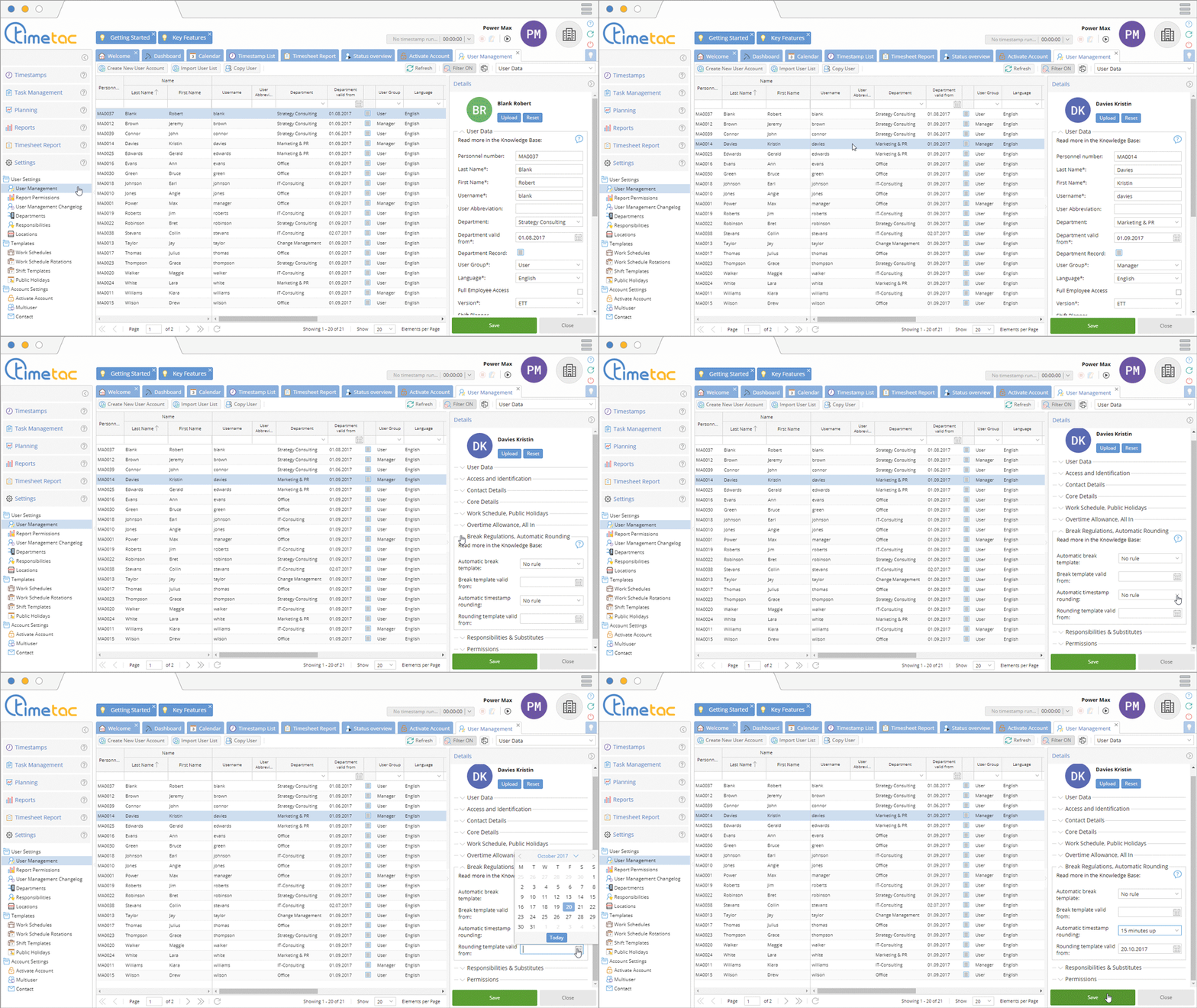
With TimeTac your employees’ timestamps can be set to automatic rounding.
Automatic Rounding
The start time for the first timestamp of the day will be rounded up to the next quarter of an hour: 08:01am > 08:15am
The end time of the last timestamp of the day will be rounded down to the next quarter of an hour: 04:13pm > 04:00pm
Another option would be mathematical rounding:
04:07pm > 04:00pm
04:08pm > 04:15pm
The interval period can be customized (5, 10, 15, or 30 minutes).
1. Navigate to the left side menu Settings – User Settings – User Management.
2. Select an employee.
3. Navigate to the right side menu Break Regulations, Automatic Rounding.
4. You can adjust your settings via the drop down menu next to Automatic Timestamp Rounding. Click on the calendar symbol in the line below and select a date to determine when the Rounding Template should be valid from.
5. Finally click on Save.